| Page 128 of 168 [2517 Posts] | Goto page: Previous 1, 2, 3, ..., 126, 127, 128, 129, 130, ..., 166, 167, 168 Next |
| Author | Message | |||||||||||
|---|---|---|---|---|---|---|---|---|---|---|---|---|
| m0r1arty |
I'd say learn how to do it better (Like The Dark Knight Rises one at Christmas!) -m0r  Posted: Wed Mar 21, 2012 11:58 am Posted: Wed Mar 21, 2012 11:58 am |
|||||||||||
 |
||||||||||||
| Rocket Rob |
If this is not big enough, I will increase the size and re-post. Do the white dots line up with the star pattern?
Posted: Wed Mar 21, 2012 11:55 am |
|||||||||||
|
||||||||||||
| Datvi |
I just noticed that david8 video in official stream is slightly better quality, than when we download it
Link (edited to make window stretchy url a clickable link ~ enaxor)
Posted: Wed Mar 21, 2012 11:53 am |
|||||||||||
|
||||||||||||
| IcedMetal |
If the PMs are reading this, throw us a bone!
Posted: Wed Mar 21, 2012 11:42 am |
|||||||||||
|
||||||||||||
| Datvi |
winged sun from trailer
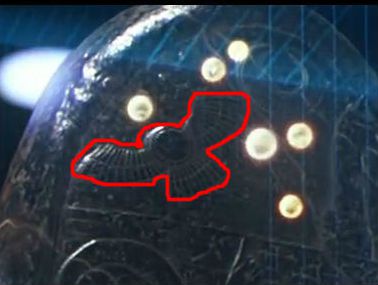 Posted: Wed Mar 21, 2012 11:41 am Posted: Wed Mar 21, 2012 11:41 am |
|||||||||||
|
||||||||||||
| AVITWeb |
When I zoom in, it looks almost like a ceiling reflection turned 90 degrees or so, but like I said I have no real software to speak of.
Posted: Wed Mar 21, 2012 11:38 am |
|||||||||||
|
||||||||||||
| DrBunker |
This one: https://www.weylandindustries.com/img/wc_bg-spheres.jpg I can see a reflection but I think it might just be a template PS style colouring to add depth. Posted: Wed Mar 21, 2012 11:35 am |
|||||||||||
|
||||||||||||
| Yoko99 |
None of us do...
Posted: Wed Mar 21, 2012 11:35 am |
|||||||||||
|
||||||||||||
| SevenSonicStructures |
Interesting: http://en.wikipedia.org/wiki/Winged_sun
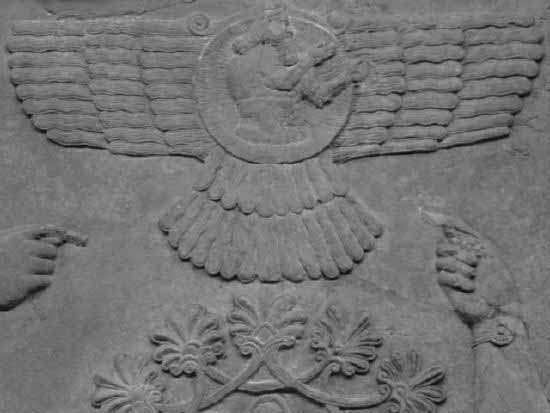
That symbol is featured in some Sumerian pictograms, and it's very similar to Weyland's logo. (I actually have no idea what I'm doing right now) Posted: Wed Mar 21, 2012 11:27 am |
|||||||||||
|
||||||||||||
| AVITWeb |
I am talking just about the JPG...the quality is better. It's actually HD (1920X108) not the video.
Posted: Wed Mar 21, 2012 11:19 am |
|||||||||||
|
||||||||||||
| johnnytourettes |
I've checked the bg video to weylands site also, playing frame by frame in VLC and can't see anything suspicious. I've tried inverting the colours, contrast, brightness and still nothing really pops out.
Posted: Wed Mar 21, 2012 11:17 am |
|||||||||||
|
||||||||||||
| AVITWeb |
Not sure that it means anything, but I just checked the source information on the Weyland site and opened up the wc_bg-spheres.jpg and noticed there is a reflection on all of the dark spheres. I have no access to photo software...if someone does lets check it out...please
Posted: Wed Mar 21, 2012 11:05 am |
|||||||||||
|
||||||||||||
| Rocket Rob |
Alien DNA?
I thought I would post this here and see if anyone can do anything with it.
Posted: Wed Mar 21, 2012 10:59 am |
|||||||||||
|
||||||||||||
| DrBunker |
Worth a try I guess considering how speculative we've been getting with barcodes and number patterns!
Posted: Wed Mar 21, 2012 10:58 am |
|||||||||||
|
||||||||||||
| bigsugad |
Weyland industries motion background
Im a graphic & UI designer so I use PS a lot but I dont think OGV compression file format is compatible with PS and i know little to nothing about video editing software. all I can think off is taking a screen grab at the interference point and then break it up into rgb layers and save as separate images within PS but its long shot. I'l get cracking at 5pm when i finish work! Posted: Wed Mar 21, 2012 10:49 am |
|||||||||||
|
||||||||||||
| Page 128 of 168 [2517 Posts] | Goto page: Previous 1, 2, 3, ..., 126, 127, 128, 129, 130, ..., 166, 167, 168 Next |
Powered by phpBB © 2001, 2005 phpBB Group